Dig-A-Plan Planning Tool
© HEIG-VD, 2025
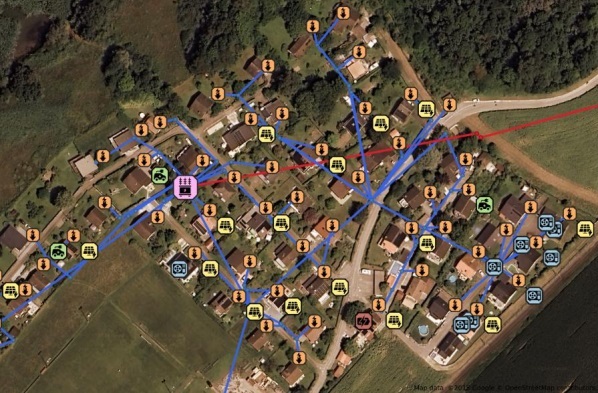
Dig-A-Plan is a scalable optimization tool designed for distribution grid planning and operational reconfiguration. It bridges the gap between long-term investment and short-term operational flexibility under uncertainty by combining two core modules:
Multistage Expansion Planning (Long-term). This module optimizes the long-term expansion of physical infrastructure, such as cables and transformers. It utilizes Stochastic Dual Dynamic Programming (SDDP) to handle complex, multistage decision-making processes over long horizons while accounting for uncertainty.
Switching Reconfiguration Planning (Operational). This module performs operational feasibility checks and manages network topology through switching and OLTC (On-Load Tap Changer) control. It evaluates numerous load and PV scenarios using a Scenario-based ADMM (Alternating Direction Method of Multipliers) approach to ensure the grid remains stable and efficient across varying conditions.
The proposed tool is designed to handle large real-world distribution networks (from 33-bus test systems up to 1’000+ nodes) and ensures that long-term planning decisions remain operationally feasible under realistic uncertainty.
For the theory behind the SDDP ↔ ADMM coupling (cuts, planning/operation loop), see: here. There is also a publication explaining the method behind using ADMM for switching reconfiguration planning, see here.
Requirements
Linux or WSL on windows.
Common tools such as
make,docker,tmux,julia, andpython 3.12.Gurobi license: Request a (WSL) license at https://license.gurobi.com/ and save it to:
~/gurobi_license/gurobi.lic
Installation
Clone the repository
   git clone https://github.com/heig-vd-ie/dig-a-plan-optimization
   cd dig-a-plan-optimization
Install make (Ubuntu/WSL only, if not already installed)
    sudo apt update
    sudo apt install make
Install project dependencies
make install-all
If this fails and you can’t resolve it quickly, please open an issue (or contact the maintainers)
Run application
Activating the Virtual Environment and Setting Environment Variables (each time you work on the project)
make venv-activate
Build and start all services
This starts the full stack (Julia, Python/FastAPI, Ray Head, Grafana, and worker processes).
    make build  # if it fails because of poetry, use `poetry lock`
    make start
Use the tmux session
make start opens a tmux session with three panes:
+------------------------------+
| Services logs                |
| (Python)                     |
+------------------------------+
| Services logs                |
| (Julia)                      |
+------------------------------+
| Interactive shell            |
| (run commands & experiments) |
+------------------------------+

Navigation: Ctrl + B, then Down Arrow → move to the next pane
Run an experiment (example: IEEE-33 reconfiguration) From the interactive pane:
python experiments/ieee_33/01-reconfiguration-admm.py
For details about reconfiguration runs (per Benders / combined / ADMM), see here.
Run the expansion problem
The expansion computes a multi-stage reinforcement plan (lines/transformers) under uncertainty (load/PV scenarios). It is solved with SDDP (Julia service). After each SDDP iteration, the pipeline runs ADMM (Python) as an operational feasibility check and uses the results to generate cuts that guide the next planning iteration.
Run an example (IEEE-33):
python experiments/expansion_planning_script.py --kace ieee_33 --cachename run_ieee33
To see all available options:
python experiments/expansion_planning_script.py --help
Results are saved under .cache/output_expansion`
For more information regarding Julia, go to docs/ops/Julia/expansion-planning.md and check following doc here.
For more information regarding looking at results, go to docs/ops/figures.md.
Run the case of Boisy & Estavayer [It needs access to confidential data]
In the dig-a-plan-data-processing, if you run the following target, you will get the data needed for boisy and Estavayer in .cache folder of this project.
cd .. && make run-all
Ray worker
This project can run heavy tasks on a remote Ray worker. The default setup assumes machines are connected via Tailscale (virtual network).
Start the stack on the head machine:
make start
This typically:
starts Docker services (Python/FastAPI, Julia SDDP service, Grafana/Prometheus/Mongo),
opens a tmux session with panes for logs and an interactive shell.
Connect to the worker machine with ssh in a separate pane or terminal:
ssh `user@worker-host` or `user@<worker-Tailscale IP>`
Or use the helper comment:
make connect-ray-worker
On the worker machine, start the Ray worker and connect it to the head:
make run-ray-worker
For full setup details (Tailscale, SSH keys, troubleshooting), see here
Development
Code formatting is handled automatically with
black. Please install the Black extension in VS Code and enable format on save for consistent formatting.Updating the Virtual Environment or Packages: If you need to update packages listed in
pyproject.toml, use:
make poetry-update
or
poetry update
Unit tests
In a shell, run make start.
If you add a new feature in python part, make sure to test
run-tests-pyto verify that existing features continue to work correctly.For Julia part, test
make run-tests-jl.
Or do the following for testsing both:
make venv-activate
make run-tests